








DTF Gang Sheet Size Guide: How Many Transfers Fit on a Gang Sheet?

Choosing the right DTF gang sheet size can save space, reduce waste, and make it easier to estimate the cost of your next print job.
But one of the most common questions is:
How many transfers actually fit on a gang sheet?
The answer depends on more than just the sheet length. Your design dimensions, orientation, spacing, and the mix of artwork on the sheet all affect how many transfers you can fit.
At Sam’s DTF Transfers, gang sheets use a 22-inch print width, while the length depends on the gang sheet size you choose.
This guide will help you estimate how much space you need and choose the right gang sheet length for your project.
A 22-inch-wide gang sheet can usually fit:
The total quantity then depends on the length of the gang sheet.
For example, a 22 × 60-inch sheet can fit approximately:
These are simplified estimates based on rectangular layouts. Real-world quantities may be slightly lower depending on spacing, artwork shape, and orientation.
A gang sheet has two dimensions:
Width × Length
At Sam’s DTF Transfers, the print width is:
22 inches
You choose the length based on how much artwork you need to place.
For example:
The longer the sheet, the more transfer designs you can place.
The important part is not simply choosing the biggest sheet.
The goal is to choose the smallest gang sheet that comfortably fits your complete order.
The easiest way to estimate capacity is to look at:
For a basic rectangular design, you can use this simple estimate:
Transfers across × Transfers down = Approximate quantity
Two 10-inch-wide transfers fit across a 22-inch sheet:
2 across
A 60-inch sheet can fit six 10-inch rows:
6 rows
So:
2 × 6 = approximately 12 transfers
The table below gives approximate quantities for several popular design sizes.
| Transfer Size | 22 × 12 | 22 × 60 | 22 × 120 | 22 × 240 |
| 3 × 3 in | 28 | 140 | 280 | 560 |
| 4 × 4 in | 15 | 75 | 150 | 300 |
| 10 × 10 in | 2 | 12 | 24 | 48 |
| 10 × 12 in | 2 | 10 | 20 | 40 |
| 11 × 14 in | — | 8 | 16 | 34 |
| 14 × 5 in* | 4 | 16 | 32 | 68 |
*For sleeve or leg designs such as 14 × 5 inches, rotating the artwork can significantly improve sheet usage.
Important: These are planning estimates, not guaranteed quantities. Spacing between designs, irregular artwork shapes, transparent areas, rotation, and cutting preferences can change the final count.
Rotating artwork can dramatically change how efficiently a gang sheet is used.
For example, consider a 14 × 5-inch sleeve design.
If you place the artwork horizontally:
But if you rotate it:
That can produce a much more efficient layout.
This is why gang sheet capacity should not always be calculated using the artwork’s original orientation.
If your design can be rotated without affecting how it will be cut or applied, experiment with both directions.
A 10-inch-wide design is one of the most common sizes for adult shirt prints.
Because the gang sheet is 22 inches wide, you can normally place:
2 × 10-inch designs across
That leaves some additional horizontal space for spacing or smaller artwork.
Approximate quantities:
About 6 10 × 10 transfers
About 12
About 20
About 24
About 48
This makes 10-inch designs especially efficient on a 22-inch-wide gang sheet.
An 11-inch design can also work very efficiently.
Two 11-inch-wide designs theoretically use the full 22-inch print width.
However, you should always consider whether your artwork requires spacing between transfers for cutting.
For taller designs such as 11 × 14 inches, the sheet length becomes the main limitation.
For example, on a 22 × 60 sheet:
This gives approximately:
8 transfers
Small logos are where gang sheets become especially efficient.
A 22-inch-wide sheet can fit approximately:
5 logos across
On a 60-inch sheet:
5 across × 15 rows = approximately 75 logos
A 22-inch-wide sheet can fit approximately:
7 logos across
On a 60-inch sheet:
7 across × 20 rows = approximately 140 logos
These smaller sizes can be useful for:
Yes.
In many cases, mixing sizes is actually more efficient than filling the entire sheet with one design size.
For example, you might place:
A single sheet can contain completely different artwork.
This is one of the biggest advantages of DTF gang sheets.
Instead of ordering separate sheets for every design, you can use available space for multiple customer jobs or garment placements.
Imagine your order needs:
You do not necessarily need four separate gang sheets.
Larger full-front graphics can be arranged first.
Then smaller:
can be placed in unused spaces.
This is where an online gang sheet builder becomes especially useful because you can see the available space before ordering.
Do not place designs so close together that cutting becomes difficult.
The exact spacing depends on your workflow.
If you plan to cut transfers individually, leave enough room to comfortably separate each design.
Designs with irregular shapes may also need more space than simple rectangles.
The goal is to use the sheet efficiently without making production unnecessarily difficult.
A simple way to decide is to estimate your artwork first and then choose the next sheet length that comfortably fits everything.
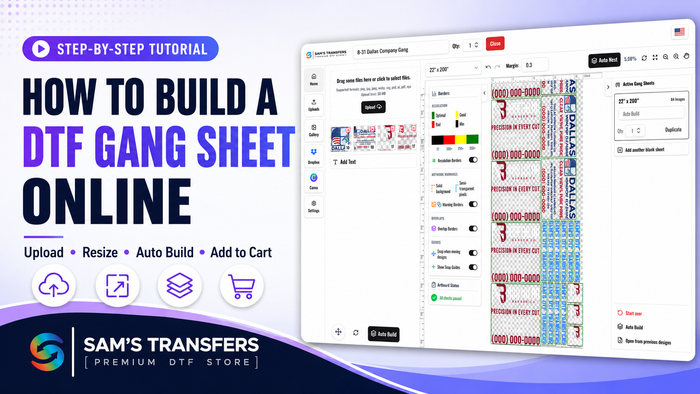
If you have several individual designs and do not want to arrange every item manually, the AutoBuilder can help speed up the process.
Instead of placing each design one by one, you can upload your artwork, choose the sizes and quantities you need, and let the builder automatically arrange the designs to use the available gang sheet space efficiently.
This can be especially useful when you are working with:
The AutoBuilder does not change the 22-inch print width or the total sheet length you choose. It simply helps organize the artwork more efficiently within the available space.
If you prefer full manual control, you can still arrange the gang sheet yourself inside the Sam’s DTF Gang Sheet Builder.
There are two main ways to order a DTF gang sheet from Sam’s DTF Transfers.
You have individual designs and want to arrange them online.
The builder allows you to:
This is the easiest option if you have not already created the complete gang sheet.
Use the Sam’s DTF Gang Sheet Builder to start arranging your transfers online.
You have already created the complete sheet in:
Your file should already be arranged at the final print dimensions.
For Sam’s Upload-Ready Gang Sheets:
If your layout is already finished, use Upload-Ready DTF Gang Sheets.
If you prefer to manually arrange your artwork, see our guide:
3 Ways to Create a DTF Gang Sheet: Photoshop, Illustrator & Canva
That guide explains how to build the full sheet yourself before uploading it for printing.
This size guide is designed to help you decide how much sheet space you need before creating the final layout.
A rotated design may use the 22-inch width much more efficiently.
Use small logos, neck labels, or sleeve graphics to fill gaps around large artwork.
Rows of similarly sized artwork are often easier to organize efficiently.
A PNG may have a large transparent canvas around the visible design.
Crop unnecessary transparent space before adding it to your gang sheet.
Always verify the dimensions of each design.
A file that looks small on screen may still be set to a very large print size.
Not necessarily.
A larger sheet is useful only when you need the space.
If your artwork fits comfortably on a shorter sheet, buying additional unused length does not improve your production efficiency.
The best value usually comes from selecting the sheet size that fits your artwork with minimal unused space.
For businesses producing larger quantities, longer gang sheets can provide strong production efficiency and access to bulk pricing.
Choosing the right DTF gang sheet size starts with understanding your artwork dimensions.
Because Sam’s DTF gang sheets use a 22-inch print width, you can quickly estimate capacity by determining:
Remember that estimated quantities are only a starting point.
Actual capacity depends on artwork shape, spacing, rotation, and how you plan to cut the transfers.
If you want an easier way to arrange separate designs, use the Sam’s DTF Gang Sheet Builder.
If you have already created the complete sheet yourself, choose Upload-Ready DTF Gang Sheets and upload your print-ready artwork.
Join our newsletter for guides, new designs and shop-growth ideas — a few great reads each month.
Comments (0)
Be the first to leave a comment.
Leave a Comment